
OpenAI Dots Explained: Features, Uses and Limits
AI assistants have mostly followed a simple model until now.
You ask a question. The AI gives you an answer. You give it another instruction. It performs another task.
OpenAI Dots are designed around a different idea: give the AI an ongoing responsibility instead of a single prompt.
OpenAI introduced Dots at DevDay on September 29, 2026 as persistent agents that can work with connected apps and their own cloud computer. OpenAI’s safety documentation describes Dots as being powered by GPT-6 Astra.
That makes Dots different from simply adding another feature to ChatGPT.
A Dot can maintain context around a responsibility, continue working between conversations and come back when something needs your attention. The exact capabilities depend on your plan, connected apps, permissions and the features available to your account.
So what exactly is an OpenAI Dot? How does it work? What can it actually do? And where are the boundaries?
Let’s break it down.
Related Articles
Before reading further, you may also like:
What Is an OpenAI Dot?
The easiest way to understand a Dot is to think of it as a persistent AI agent inside ChatGPT.
Normal ChatGPT is primarily interaction-driven. You start the conversation and provide instructions as the work progresses.
A Dot is built around an ongoing responsibility.
For example, instead of saying:
“Research my competitors.”
you could give a Dot a broader responsibility:
“Monitor these competitors, review important changes, organise the findings and prepare a weekly summary. Ask me before making any external changes.”
That difference is important.
A simple way to think about it
ChatGPT:
You ask → AI answers
AI agent:
You assign → AI works on the task
Dot:
You assign a responsibility → AI continues working → AI returns when needed
OpenAI’s own materials describe Dots as persistent agents that can work with connected applications and a cloud computer.
OpenAI Dots vs Normal ChatGPT
The distinction becomes clearer when you compare the two.
| Normal ChatGPT | OpenAI Dot |
|---|---|
| Primarily conversation-based | Responsibility-based |
| Usually starts with your prompt | Can continue work between conversations |
| You direct each next step | Can work through multiple steps |
| Best for individual tasks | Designed for ongoing work |
| Context is tied to the interaction | Can retain relevant ongoing context |
| Produces responses | Can work toward an outcome |
The most important word here is persistence.
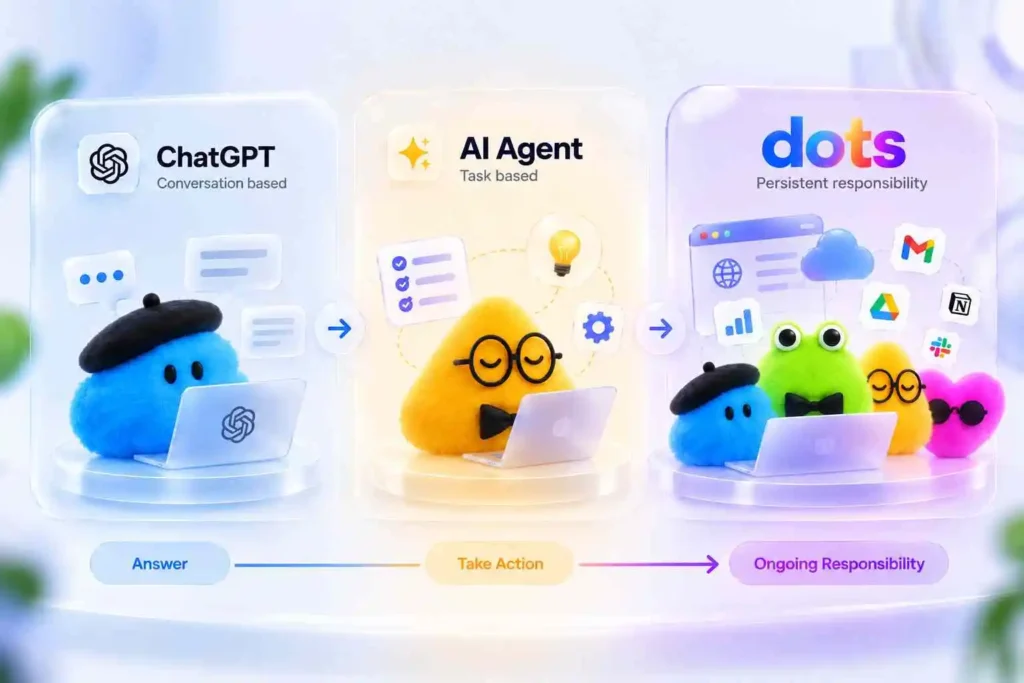
A Dot is designed to maintain an ongoing piece of work rather than treating every conversation as a completely new assignment.
That makes it especially interesting for projects that require repeated monitoring, research or follow-up.
How Do OpenAI Dots Work?
At a high level, the workflow looks something like this:\
Your Goal → OpenAI Dot → AI Reasoning → Cloud Computer + Browser → Connected Apps and Tools → Research / Analysis / Actions → Results and Human Review
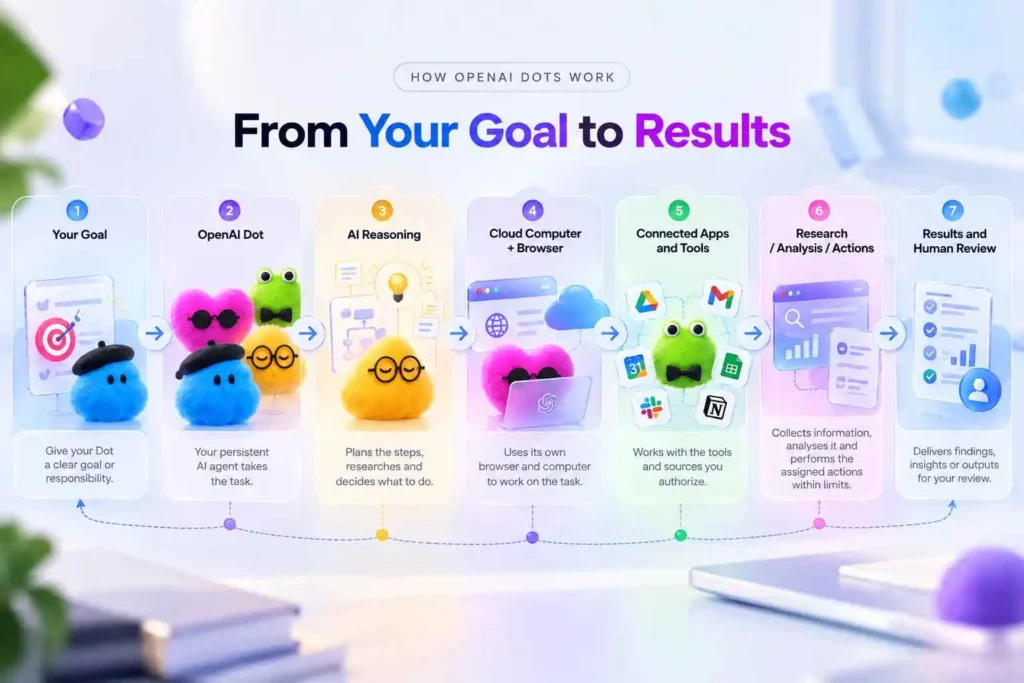
A Dot can work with connected applications and tools available to it. OpenAI’s current documentation shows support for managing connected apps, computer capabilities and messaging integrations within eligible workspaces.
The cloud computer is another important part of the concept.
Instead of depending entirely on your own laptop being switched on, a Dot can work in its cloud environment. That makes longer-running tasks possible without requiring you to sit in front of your computer.
The exact workflow still depends on what the Dot has permission to access.
A Dot Can Work With Connected Apps
This is where the idea becomes much more practical.
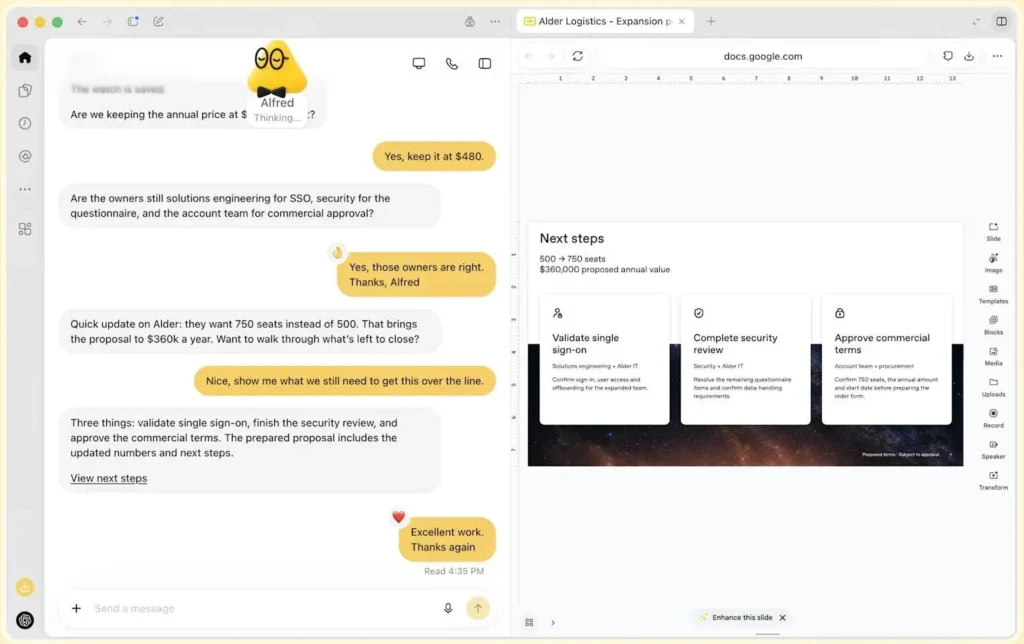
A Dot can work with connected applications and information sources that you’ve explicitly authorized. OpenAI’s current ecosystem includes integrations and connected-app functionality across tools such as documents, storage, communication and development workflows.
That creates workflows that look more like:
Research → analyse → organise → create → report
instead of:
Prompt → answer
For example, imagine giving a Dot access to a Google Sheet and asking it to review new rows each week, identify significant changes and prepare a summary.
You aren’t asking for one report.
You’re assigning an ongoing responsibility.
What Can OpenAI Dots Actually Do?
There isn’t one single “Dot use case.” The idea is broad because the agent can combine reasoning, connected information and tools.
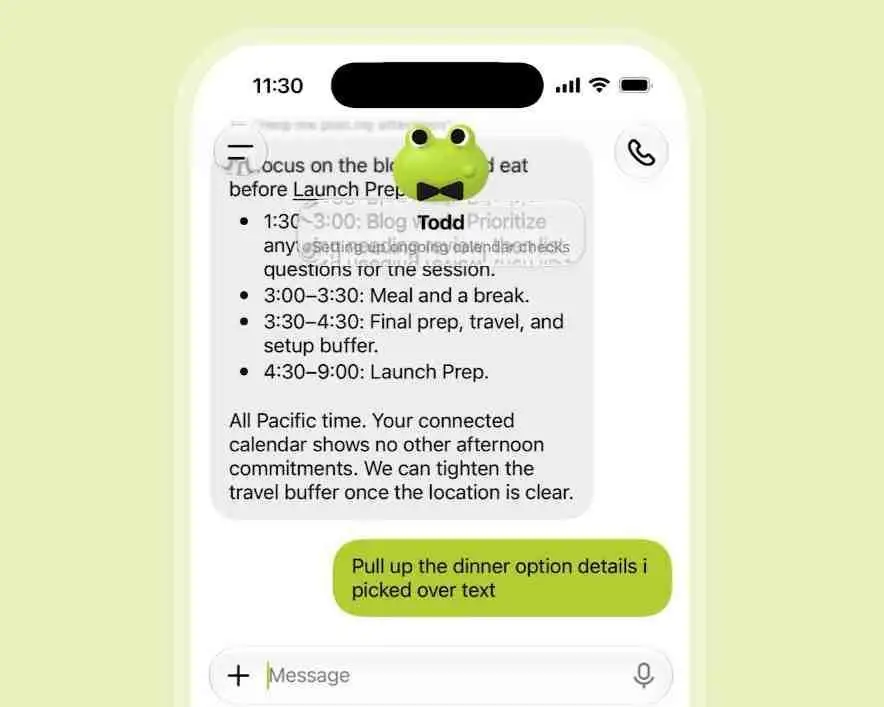
Here are some practical examples.
1. Research
You could ask a Dot to continuously research a topic and surface meaningful changes.
For example:
“Track developments around AI search and send me a summary when there is a significant new development.”
Instead of starting a new conversation every time you need research, the Dot can operate around an ongoing objective.
2. Competitor Monitoring
Imagine giving a Dot a list of competitors and asking it to track their public activity.
The workflow might look like:
Competitor Websites
        ↓
New Content
        ↓
Messaging Changes
        ↓
Important Developments
        ↓
Weekly Summary
This can be useful for agencies, marketing teams and businesses that regularly monitor competitors.
3. Reporting
A Dot can potentially help turn raw information into recurring reports.
For example:
Data → Analysis → Significant Changes → Explanation → Report
The marketer still decides what matters. The Dot can reduce the repetitive work required to prepare the information.
4. Content Work
A Dot could potentially help maintain:
- Content research
- Topic lists
- Editorial calendars
- Content audits
- Brief preparation
- Research notes
- Supporting documentation
This is also where your existing content ecosystem could connect naturally.
For example, a Dot could help maintain ideas around AI Search, Google Analytics 4 or YouTube research and identify areas where your content library is missing supporting material.
What Makes Dots Different From Traditional Automation?
This is probably one of the most important concepts to understand.
Traditional automation tools such as Make or n8n generally work through predefined logic.
For example:
New row in Sheet
↓
Send data to AI
↓
Generate text
↓
Create document
The workflow has already been designed.
An AI agent works differently.
You can give it an objective and allow it to determine intermediate steps.
Objective
↓
Understand the task
↓
Research
↓
Analyse
↓
Determine next step
↓
Continue
↓
Ask for human input when necessary
That’s why Dots are closer to persistent agents than conventional automation.
This doesn’t make automation tools obsolete. In many situations, the two approaches could complement each other.
🧠 Dots Can Remember Context
Another important part of the experience is continuity.
OpenAI says Dots can use relevant ChatGPT memory alongside their own context and notes when carrying out ongoing work.
Imagine working on a research project for several weeks.
With a normal chatbot workflow, you may repeatedly need to explain:
- What the project is
- What you’ve already decided
- What format you prefer
- What information is important
- What should not be changed
A persistent agent can maintain that context as part of the ongoing responsibility.
That doesn’t mean it remembers everything perfectly or that you should blindly trust its memory. It means the workflow is designed around continuity.
The Most Interesting Part: Proactive Research
This is also where one of the most important limitations appears.
OpenAI’s documentation says a Dot can conduct proactive research by checking permitted connected sources even when you aren’t actively asking it a new question.
That could be useful for ongoing monitoring.
For example:
“Check my permitted sources and let me know when something important changes.”
The Dot can investigate within the limits of its available sources and prepare information for you.
But there’s an important boundary.
Proactive Research Is Read-Only
Search Engine Journal highlighted this distinction in its coverage of Dots: proactive research can read permitted connected sources and save notes, but it cannot directly send messages, modify content through plugins or control a browser or computer in that mode. That limitation is also explicitly described in OpenAI’s own safety documentation.
This means:
Detect → Analyse → Report
rather than automatically:
Detect → Change everything
That’s an important distinction for businesses.
If a Dot notices that a competitor changed its website, you may want the Dot to tell you about it.
You may not want it automatically changing your website because of that discovery.
Dots Have Permission Controls
OpenAI has built multiple layers of controls around Dots.
Depending on the environment, administrators or users can control:
- Connected applications
- Computer capabilities
- Custom rules
- Messaging integrations
- Approval requirements
In Enterprise workspaces, Dots are off by default and administrators can control access to them and their computer capabilities.
OpenAI also says its safeguards include permission controls, custom rules and automated review of certain actions.
That matters because an AI agent with access to your files, tools and accounts is fundamentally different from an AI that only answers questions.
What Should You Actually Give a Dot Permission to Do?
This is where I think marketers should be careful.
A simple model is:
| Action | Suggested approach |
|---|---|
| Read a spreadsheet | Allow |
| Analyse reports | Allow |
| Research public information | Allow |
| Prepare a draft | Allow |
| Prepare recommendations | Allow |
| Send an external email | Review first |
| Modify important website content | Human approval |
| Change advertising settings | Human approval |
| Make purchases | Explicit approval |
The goal shouldn’t be maximum autonomy.
The goal should be useful autonomy with sensible boundaries.
OpenAI Dots for Everyday Work
The possibilities go beyond marketing. A person could potentially use a Dot for:
Research
Monitor a topic and prepare summaries.
Project management
Keep track of ongoing information and surface items requiring attention.
Documents
Work through connected files and organise information.
Development
Assist with software-related workflows when the required tools are available.
Communication
OpenAI’s current workspace documentation describes integrations with Slack and Microsoft Teams for eligible environments.
The underlying idea stays the same:
Give the agent responsibility rather than repeatedly giving it isolated commands.
Who Can Access OpenAI Dots?
Availability is still rolling out.
OpenAI’s current help documentation says Dots are rolling out gradually. Pro users are eligible in supported markets while Business Premium users have access across supported ChatGPT regions. Enterprise users can try the beta when an administrator enables it.
OpenAI also notes that some features may not yet be available to every account.
That is worth keeping in mind because Dots are a newly launched product and the capabilities are still evolving.
My Perspective as a Digital Marketer
What interests me most about Dots isn’t simply that they can use a browser or connect to apps.
It’s the change in the working relationship between a person and AI.
For a long time, the basic model was:
“Here is my instruction. Give me the result.”
With agents, the model becomes:
“Here is the objective. Work through the problem.”
Dots take that idea one step further:
“Here is the responsibility. Keep working on it and come back when I need to be involved.”
That could change how people think about AI assistants.
For digital marketers, this could mean less time spent repeatedly checking dashboards, collecting information, preparing routine reports or starting the same research process from scratch.
At the same time, I don’t think every task should be handed over to an autonomous system.
Strategy still needs context. Brand decisions still need judgment. Sensitive actions still need accountability.
The most useful relationship may therefore be AI handling continuity while humans retain authority.
That’s the part of OpenAI Dots I find most interesting.
Conclusion
OpenAI Dots are a significant step toward persistent AI agents that can work on ongoing responsibilities rather than simply answering individual prompts.
They combine AI reasoning with connected applications, persistent context and cloud-based computer capabilities. That opens the door to workflows involving research, monitoring, reporting, content, projects and many other forms of work.
But the limitations are just as important to understand.
Proactive research has read-only restrictions. Access depends on permissions and available integrations. Dots can still make mistakes and consequential actions may require human review.
So the real question isn’t whether Dots can do everything for us.
It’s which responsibilities are worth giving to an AI agent while keeping important decisions in human hands.
That is likely to be one of the most interesting questions in the next stage of AI adoption.
😊 Thank You for reading! 😊
📖 Learn More About Me
If you’re interested in learning more about my background, projects and journey in digital marketing, feel free to learn more about Anupam Das. I regularly share practical insights, industry observations and hands-on learning experiences in Paid Ads, SEO, AI Search, Google Analytics, Performance Marketing and Marketing Automation.
🚀 Explore My Digital Marketing Services
Looking to improve your online visibility through SEO, content marketing, website optimization or AI-driven digital strategies? Explore my Digital Marketing Services to see how I can help your business grow.
📩 Let’s Connect
Have a question about OpenAI Dots, Paid Ads, Social Media, SEO or digital marketing? Get in touch for Paid Ads, SEO, Social Media and digital marketing consulting. I’d be happy to discuss your goals and explore how I can help.
🤝 Connect With Me
I regularly publish practical insights on SEO, Google Analytics, AI Search, Performance Marketing and Digital Marketing. If you’d like to follow my journey or get in touch, I’d love to connect.
🌐 Website: https://dasanupam.com/
💼 LinkedIn: https://www.linkedin.com/in/digi-anupam/
📧 Email: [email protected]
Frequently Asked Questions (FAQs)
OpenAI Dots are persistent AI agents inside ChatGPT designed to handle ongoing responsibilities using connected tools, apps and computer capabilities.
ChatGPT primarily responds to your conversations and instructions. Dots are designed to maintain an ongoing responsibility and continue working between interactions.
Dots can have browser and computer capabilities depending on the permissions and features available to the account or workspace. Proactive research has additional restrictions.
Not during proactive research. OpenAI says proactive research tools cannot directly control a browser or computer or change content through plugins. Other tasks may have different capabilities depending on permissions and safeguards.
No. Dots are being rolled out gradually with availability depending on plan, region and workspace configuration.